Mixed Addition and Subtraction Worksheets
Alternate whole-number addition and subtraction with matching answer keys. A separate decimal column arithmetic pack provides exact mixed/addition-only/subtraction-only tenths and hundredths exercises with correctly aligned points and worked steps.
Same seed, questions and vector diagrams as the downloaded student edition.
Mixed Addition Subtraction Worksheets
Practice worksheet · Sheet ID 20261104
Quick answer check · Your answers stay in this browser. Enter the answer format shown beside each question, then check without revealing the answer key.
Enter your answers to begin.
Mixed arithmetic requires choosing the operation
Alternating addition and subtraction develops operation recognition as well as numerical accuracy. A single-operation worksheet isolates one technique.
Check an example: Example: 503 − 278 = 225 and 225 + 278 = 503. The second calculation checks the first.
Questions to answer before printing
Use this worksheet when a practice set should alternate whole-number addition and subtraction, or focus on one of those operations. The separate decimal-column panel is a different exercise with tenths and hundredths.
How can I check a subtraction answer?
Add the difference back to the number being subtracted. For 502 − 178 = 324, check 324 + 178 = 502. If the sum does not return to the starting number, review the place-value columns and any regrouping.
Can a mixed subtraction worksheet produce a negative answer?
Yes. The whole-number mixed-operation generator can subtract a larger second number from a smaller first number. Keep the negative sign: 312 − 487 = −175, and check it by adding 487 back to −175 to recover 312.
Standards context: Common Core: Grade 4 Multi-Digit Addition & Subtraction. This standard describes standard-algorithm addition and subtraction of multi-digit whole numbers; our decimal extension and negative-difference examples are not a grade certification.
Prepared by Math Worksheet Studio · Content updated November 8, 2026. Mathematics and printer output require classroom review.
Addition and subtraction worksheet: printable practice options
Create a fresh practice sheet for this specific math skill using the generator above. These are automatically generated questions, not scans of a fixed worksheet or promises of alignment to a particular school grade.
What is included?
- Easy, Standard or Challenge number ranges and up to 40 questions in Standard mode (some topic settings have lower limits).
- Operation: Mixed, Addition, Subtraction.
- Separate student questions and matching teacher answer keys on A4 or US Letter, both reproducible with the same seed.
- Step-by-step solutions are also available for this verified topic.
How to use this worksheet
- Read the operation sign before calculating; addition combines the values, while subtraction takes the second value from the first.
- Keep place-value columns aligned and regroup where necessary. If the second number is larger, retain the negative sign in the difference.
- Check addition with subtraction and check subtraction by adding the subtrahend back to the difference.
Refresh the seed to generate another distinct set. For review, download the separate answer PDF instead of printing answers over the questions. Worked steps are available only on step-verified topics.
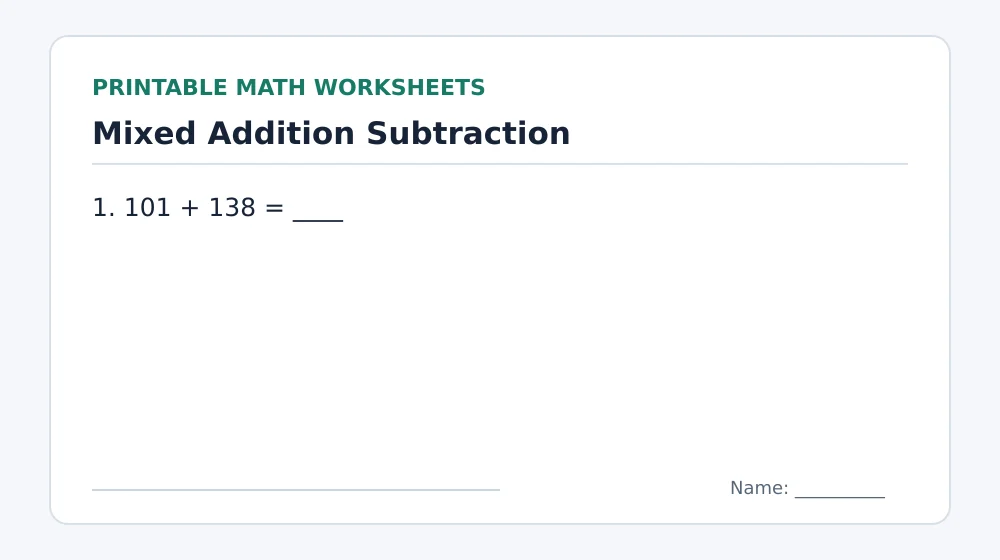
Example printable practice
A fixed-seed preview created from the same deterministic generator used above.
Adding and subtracting decimals worksheets — line up the decimal points
The original whole-number worksheet above is unchanged. The separate Decimal addition and subtraction panel now creates genuine vertical column problems with tenths or hundredths, matching student worksheets and teacher answer PDFs. The decimal points align exactly on the printed page; answers use exact fixed-point calculations instead of floating-point rounding.
- Choose addition, subtraction or a mixed worksheet, then tenths, hundredths or both.
- Select regrouping: mixed, carry/borrow required, or no carry/borrow. Subtraction uses nonnegative results, and each operand is displayed to the same selected decimal precision.
- Use the existing seed, difficulty, question count, Letter/A4 paper and extra writing-room choice. Download the student column worksheet, matching teacher key or inverse-operation worked steps.
Example: 12.50 − 3.75 = 8.75. On the PDF, the two operands and their answer share one vertical decimal-point column. This feature does not generate money word problems, negative differences, thousandths, or curricula certified by an educational authority. Copy reproducible link saves the decimal operation, decimal places and regrouping selections for this separate PDF pack.
Worked example
Question: 101 + 138 = ____
Answer: 239
- Calculate: 101 + 138 = 239.
- Inverse check: 239 − 138 = 101.
This example is generated from a fixed seed so the explanation and answer refer to the exact same mathematical problem.
Teaching notes
The generator offers Easy, Standard and Challenge numerical ranges. These are practice settings, not school curriculum levels or official assessment standards.
- Keep the minuend and subtrahend in their original order; reversing them changes the difference.
- If the second number is larger, retain the negative sign and verify by adding the subtrahend back to the difference.
Always review the printed answer key before distributing worksheets to a classroom.
Common mistakes
- Reversing the order of the two numbers in subtraction, which changes the difference.
- Dropping the negative sign when the second number is larger than the first.
Check your answers
The answer-key PDF is generated from the same exact problem set and seed as the practice sheet. Use it after attempting each question. You can reproduce the sheet later using the same topic, difficulty, question count and seed.
For printing, select US Letter or A4.
Compare related practice skills
These generators teach different tasks. Choose the exercise that matches the specific skill you need.